FOR BEVERAGE DEVELOPMENT STUDIOS

Everything your studio knows, at work.

Masek is an app on your Mac that keeps your studio's memory: clients, briefs, tastings, suppliers, decisions. It prepares the next step before you ask, and never sends an email, invite or file out without your yes.

For Mac (M1 or newer) · Private beta, set up with you · Needs a paid Claude plan from Anthropic

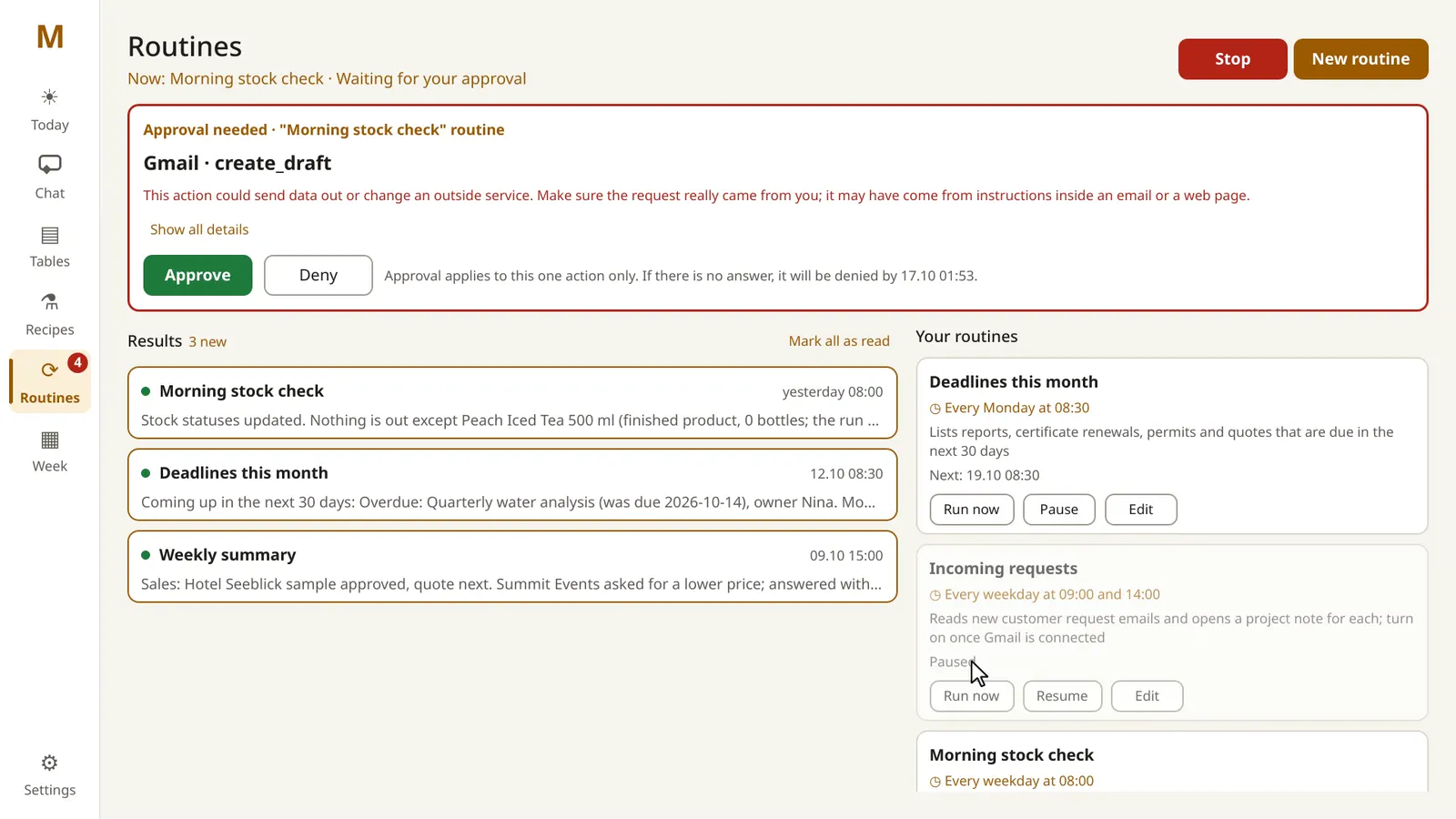
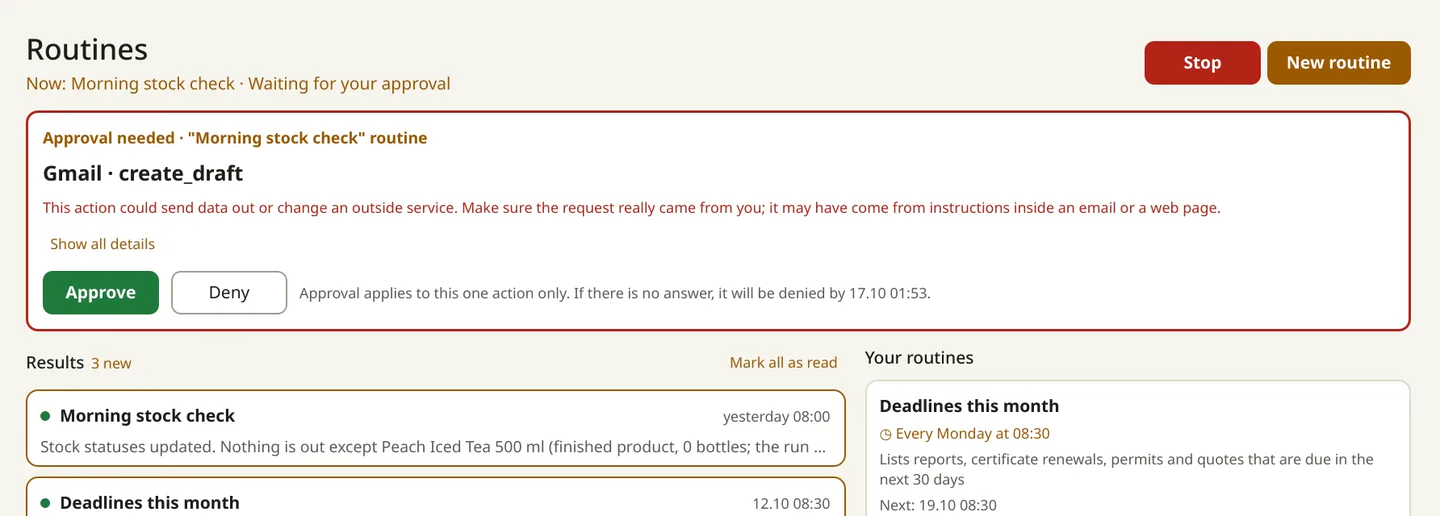
A routine wants to save an email draft. It asks for a yes; this time it's no.

Sped up while Claude thinks; real replies take a little longer.

Text version
  1. On the Routines screen, the morning stock check routine is running.
  2. It wants to save an email draft in Gmail, so an approval card appears with a warning that the request may come from an email or web page.
  3. Deny is pressed. The card closes and nothing is saved.

Built on what you already have.

  • Your files. Your studio lives in one folder on your Mac: notes and spreadsheets you can open in Excel, Numbers or any text editor. We call it the studio folder.
  • Your Claude plan. Masek does its thinking with Claude, Anthropic's AI, through a paid plan your studio holds directly with Anthropic. Not on Claude yet? We'll help you choose a plan on the setup call. We never charge for Claude.
  • Your computer. Masek has no servers of its own. Your studio folder stays on your Mac.
  • Your way of working. Your price list, your quote terms, your briefing questions, written down once. Masek works from them.

WHAT WE BELIEVE

  1. Knowledge should compound, not scatter.

    A studio learns something from every brief, tasting and supplier call, and most of it is lost: in an inbox, a spreadsheet, one person's memory. We think that knowledge is the studio's real asset. So Masek writes it down where it belongs, links it to the client and the project, and brings it back when it matters: the next quote, the next brief, the next tasting.

  2. Numbers are calculated, not guessed.

    A language model is good with words and unreliable with arithmetic. So we're building recipe numbers that come from a calculation engine, not from the model, with the source of every ingredient value and the assumptions it made. A first studio is piloting it. For quotes, Masek is set up to take prices only from your price list. When a number isn't there, it says so and leaves the line open.

  3. Your recipes are yours.

    A formulation is the studio's craft and often a client's secret. We're building Masek so that we never have it: the recipe engine, in pilot with a first studio, runs on the studio's Mac, keeps its history there, and sends nothing to Claude or to us. Everything else Masek keeps is ordinary files you can copy, back up or take with you.

  4. It works ahead of you.

    The routine work of a studio is predictable: stock runs low, deadlines come round, suppliers need ordering. We think software should do that part before you sit down. On a schedule you set, while Masek is open on your Mac, it checks stock against your minimums, lists the deadlines and prepares the supplier order. It prepares; you decide.

  5. Nothing leaves without you.

    Your name is on every email to a client and every order to a supplier, so we don't let Masek send one on its own. Before anything goes out to a client or a supplier, it shows you what it wants to send and to whom, and waits. If you don't answer, the answer is no.

01 · TODAY

Your day, already thought through.

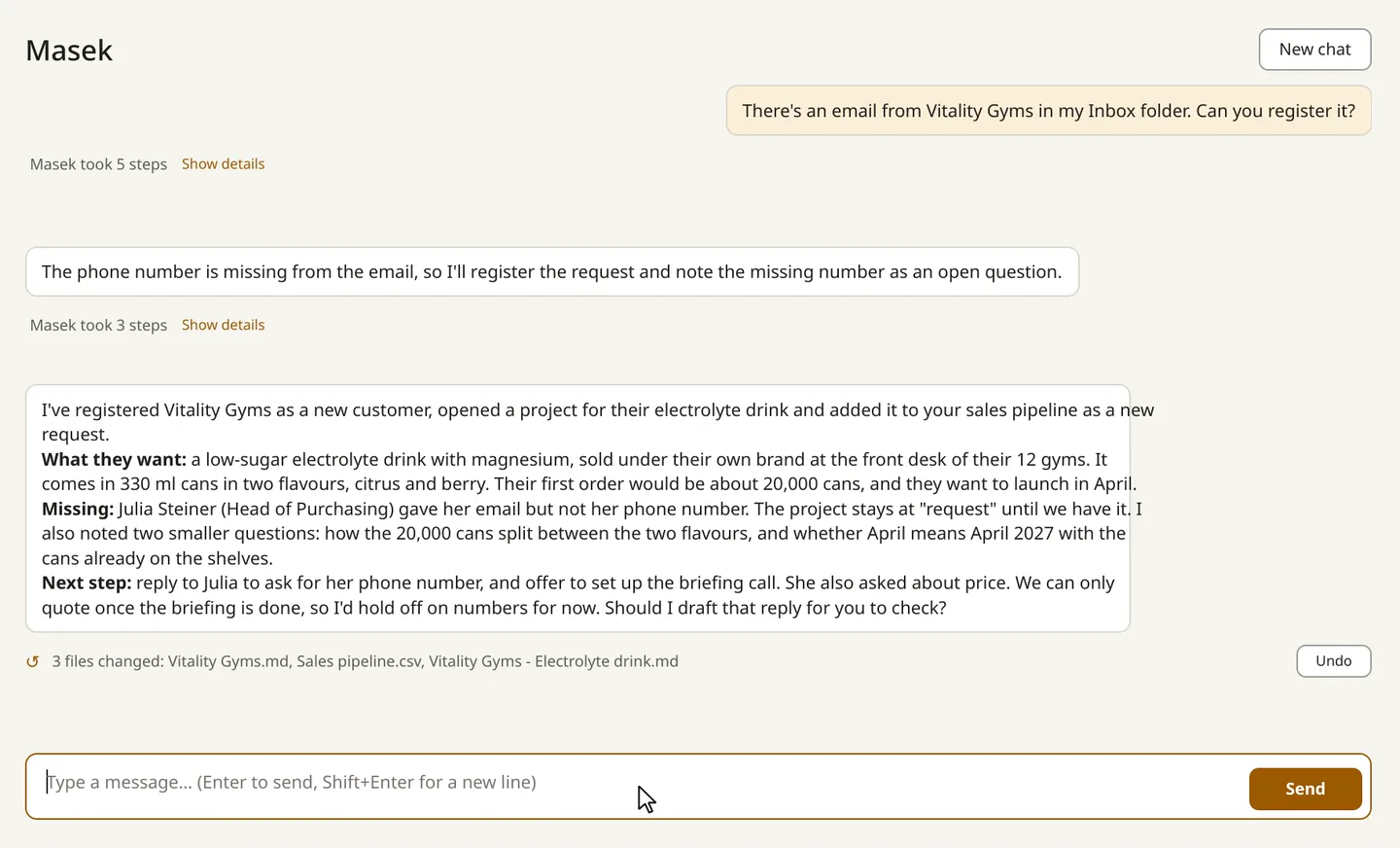
Open Masek and today is on one page: the plan, the open tasks, the deadlines and what the morning stock check found. Tick a task and it's ticked in your notes too. A new request in? Save the client's email into the studio's Inbox folder (a folder on your Mac, not your mailbox), or paste it, and ask Masek to register it. It becomes a project, and Masek asks for what's missing instead of guessing. One click plans the rest of the day.

  • 08:00 Morning stock check · 2 items below minimum
  • Supplier order prepared · ready to review
  • New request · Vitality Gyms · phone number missing

Note: scheduled checks run while Masek is open on your Mac.
Today screen, "Notes from today": the morning stock check's findings, each naming an item below its minimum and a suggested order from a supplier.
Today: what the morning stock check found.A client's email becomes a project. The missing phone number is asked for, not made up.

Sped up while Claude thinks; real replies take a little longer.

Text version
  1. Masek is asked: "There's an email from Vitality Gyms in my Inbox folder. Can you register it?"
  2. It notes that the email has no phone number and records that as an open question instead of guessing.
  3. It registers the client, opens a project for the drink and adds it to the sales pipeline.
  4. It ends with "Should I draft that reply for you to check?" and "3 files changed", with an Undo button.
02 · RECIPES · COMING TO PILOT STUDIOS

Formulation you can audit.

A recipe engine, in pilot with a first studio, turns a brief into a first draft in kilograms per 1,000 litres and for your batch, with Brix, acidity, pH, CO₂, energy and juice content against their targets, every warning, the assumptions it made, and where each ingredient value comes from. It's a draft for the bench, not a replacement for it: every result is marked as a draft that needs tasting and your formulator's sign-off.

  • Ingredient sources: supplier · literature · derived · not verified
  • Export as PDF or plain text · documents in English or German

Note: Not part of the beta yet. Ask us about the pilot.

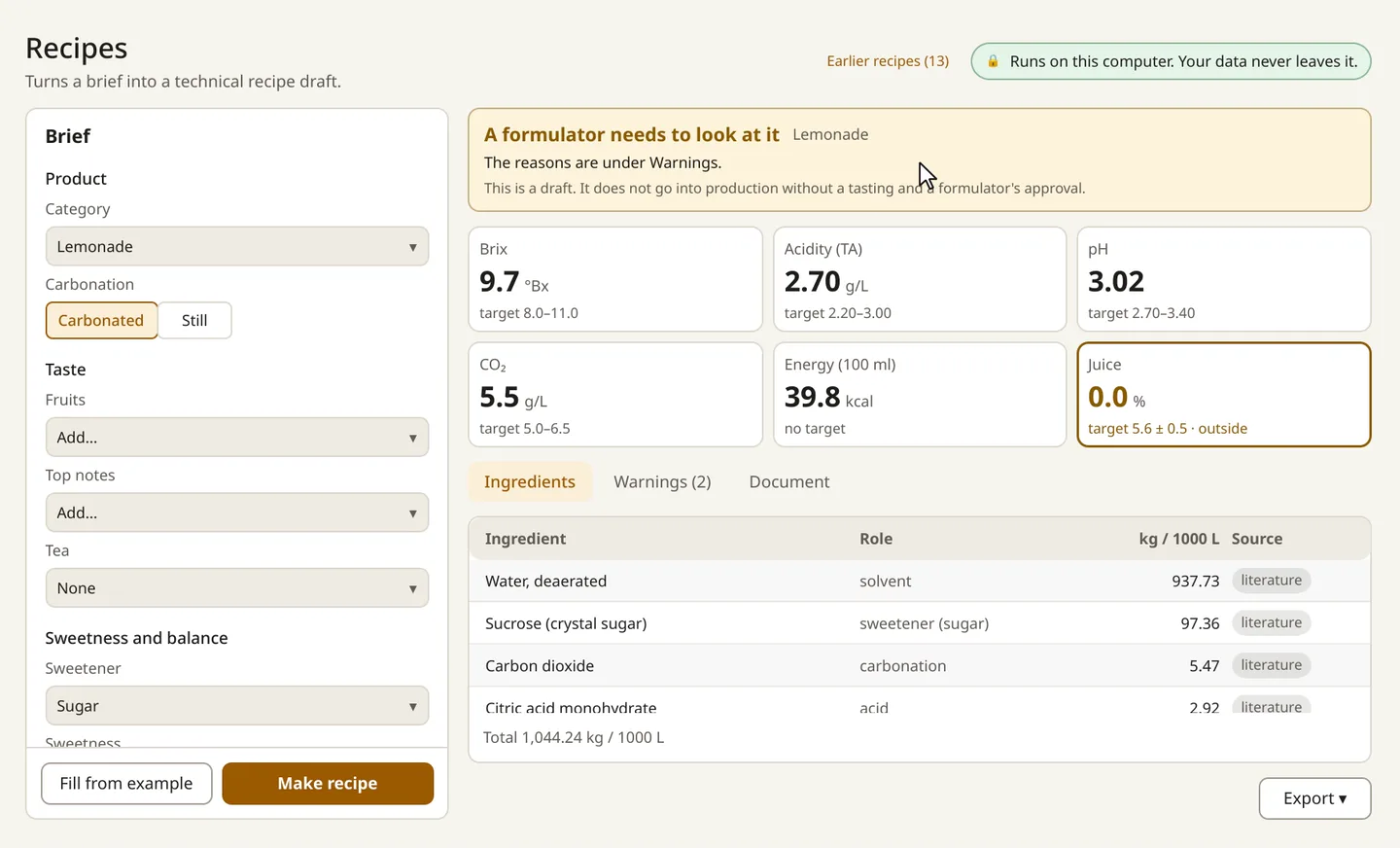
Recipe result: "A formulator needs to look at it" above six number cards: Brix 9.7, acidity 2.70 g/L, pH 3.02, CO₂ 5.5 g/L, energy 39.8 kcal, juice 0.0 % outside its target.
A recipe result: six numbers against their targets.Real time. The numbers come from a calculation on the computer, not from a chat.
Text version
  1. The brief on the Recipes screen is empty. Fill from example fills in a lemonade.
  2. Make recipe is pressed; the screen shows "Calculating…".
  3. Number cards appear: Brix 9.7, acidity 2.70 g/L, pH 3.02, CO₂ 5.5 g/L, energy 39.8 kcal per 100 ml, and juice 0.0 %, marked outside its target.
  4. A banner says a formulator needs to look at it. The ingredient table lists each amount in kg per 1,000 litres with its source.

03 · ROUTINES

The studio runs while you sleep, and asks before it acts.

A routine is a task with a time, written in plain English: "Weekdays 08:00: check ingredient and packaging stock against the minimums and suggest orders for anything short." Masek runs it on schedule and writes down what it found and what it did. Anything that would leave the studio, like an order email, stops at a card on the Routines screen with a notification. If you don't answer, it isn't done, and the result lists what was left undone so you can do it in one step later.

  • Morning stock check · weekdays 08:00
  • Deadlines this month · Mondays
  • Weekly summary · Fridays

Note: routines run while Masek is open and your Mac is awake, so the simplest setup is to leave Masek open on the studio's Mac. If the Mac was asleep, a run missed earlier today starts when you open Masek. Routines use your Claude plan like any other Claude use.

A routine wants to save an email draft. It asks for a yes; this time it's no.
Text version
  1. An approval card from the "Morning stock check" routine: Gmail · create_draft, with a warning that the request may come from an email or web page.
  2. Deny is pressed.
  3. The card closes. The draft is not saved.
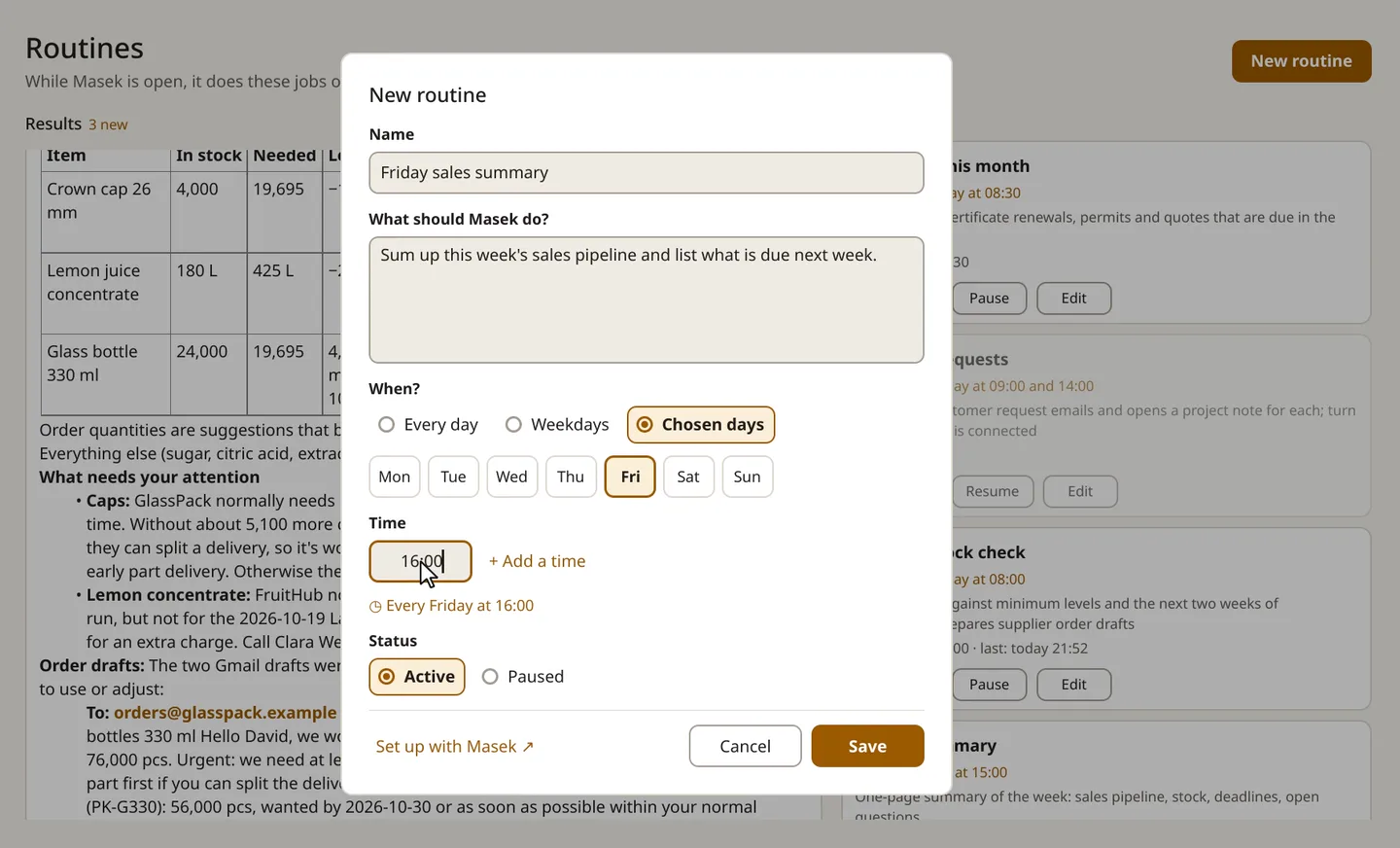
A new routine: what to do, which day, what time.
Text version
  1. New routine. Name: "Friday sales summary".
  2. What Masek should do, in plain English: "Sum up this week's sales pipeline and list what is due next week."
  3. When: chosen days, Friday, at 16:00.
  4. Save is pressed.

04 · TABLES

Stock, suppliers, price lists, in the files you already use.

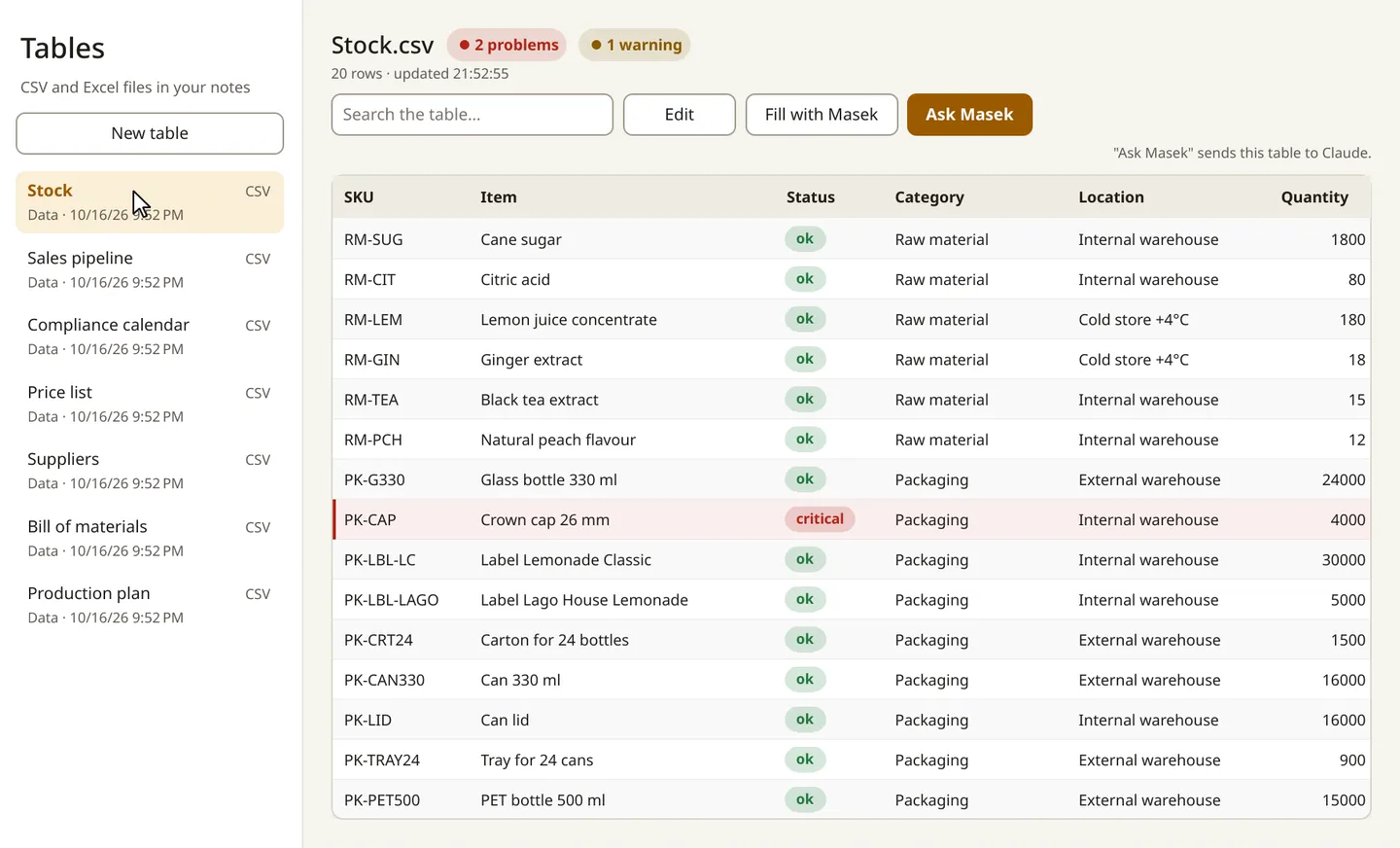
Masek opens the spreadsheets in your studio folder and shows stock in colour: ok, low, critical, out. Edit a sheet right there, like in any spreadsheet app; your edit stays on your Mac and can be undone. When you want help, ask Masek about a table, or describe a new one and let Masek draft it. You check the draft before anything is saved.

  • Stock.csv · 2 problems · 1 warning
  • Price list · Suppliers · Customers

Note: spreadsheets saved as CSV can be edited in Masek; Excel files open to view. When you ask Masek about a table or have it draft one, that table and any notes it looks at go to Claude.

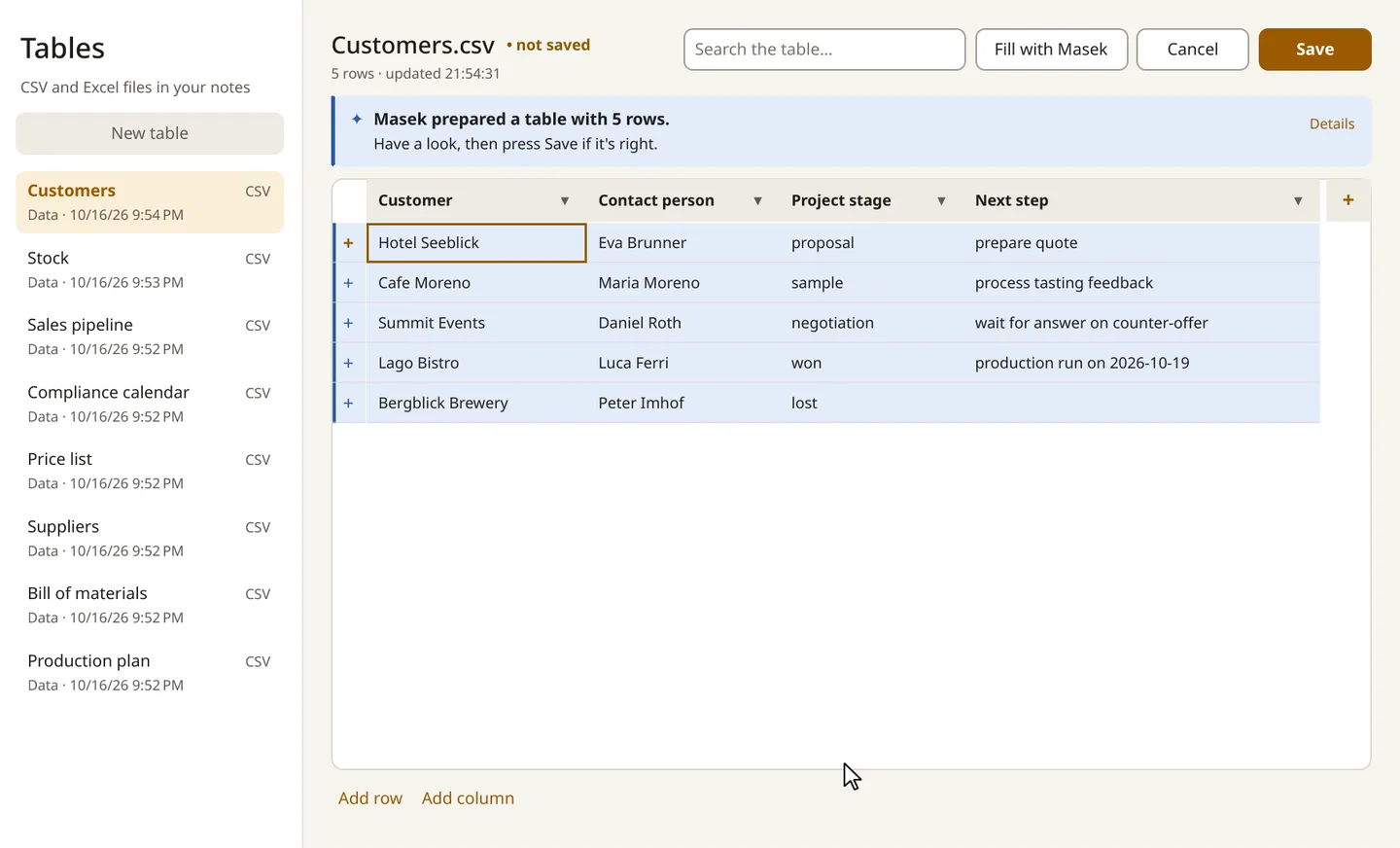
Describe the table you need. Masek drafts it; nothing is saved until you press Save.

Sped up while Claude thinks; real replies take a little longer.

Text version
  1. New table "Customers", started with Create with Masek. The dialog says the description and related notes are sent to Claude.
  2. The description: customers with contact person, project stage and next step, filled in from the customer notes.
  3. Masek prepares a draft with 5 rows, marked "not saved".
  4. Save is pressed.
Stock at a glance, straight from your spreadsheet.
Text version
  1. Stock.csv opens from the studio folder.
  2. Each row has a status pill, such as ok or critical.
  3. The header sums it up: "2 problems · 1 warning".

05 · MEETINGS

From tasting notes to the next action.

After a tasting or a client call, add the transcript or your notes to the studio folder and ask Masek to process them. It writes the meeting note, what was decided for each sample and who does what by when, files it under the client's project and updates it: the feedback on each sample, the next step and, when the tasting settled it, the project's stage.

  • Tasting · Cafe Moreno · round 2
  • Decided per flavour · actions with dates
  • 5 files changed · Undo

Note: Masek works from a transcript or notes you add, for example the transcript your video-call app produces. It doesn't record meetings on the Mac.

From a transcript in your folder
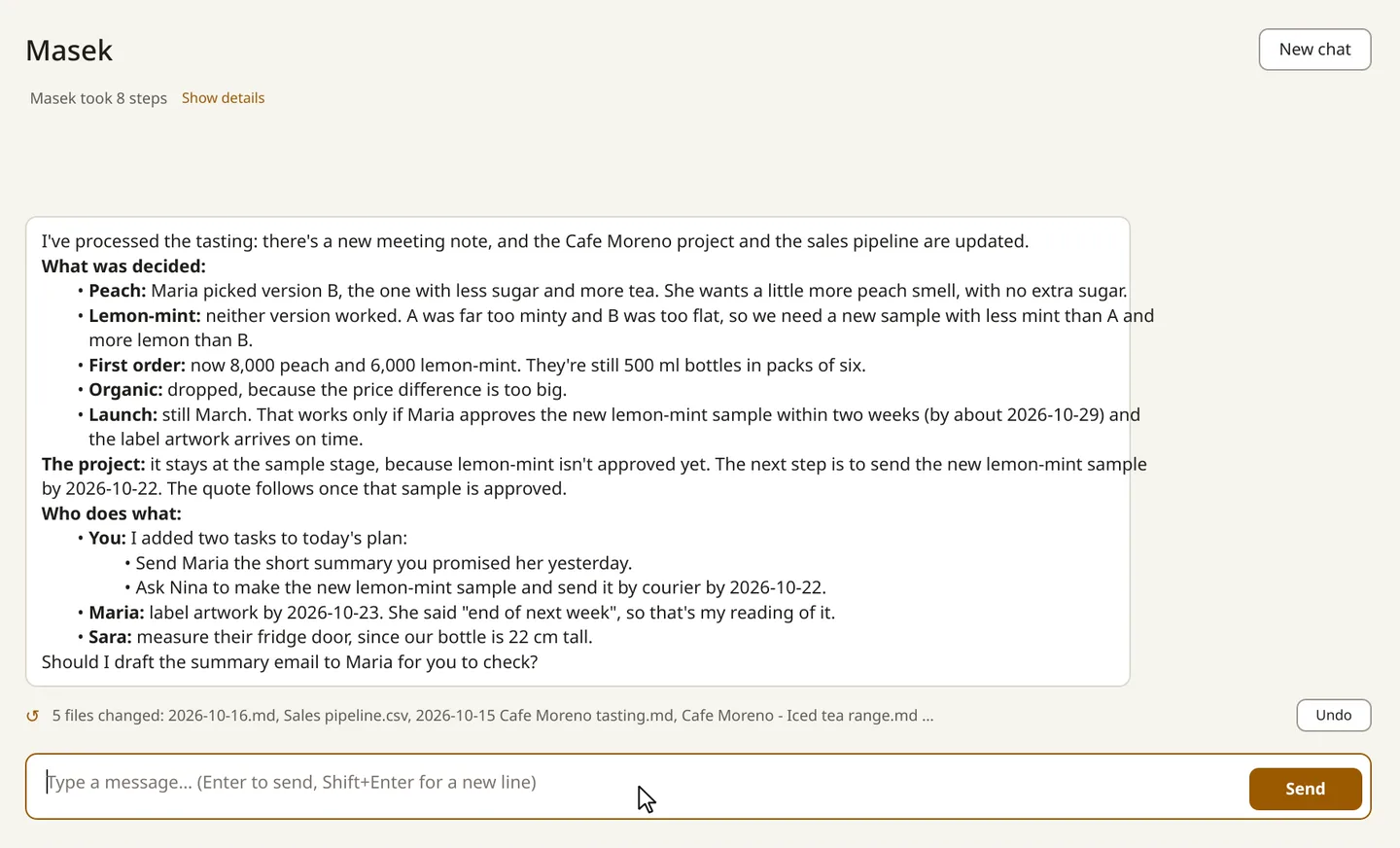
Yesterday's tasting, processed from its transcript: decisions, actions, project updated.

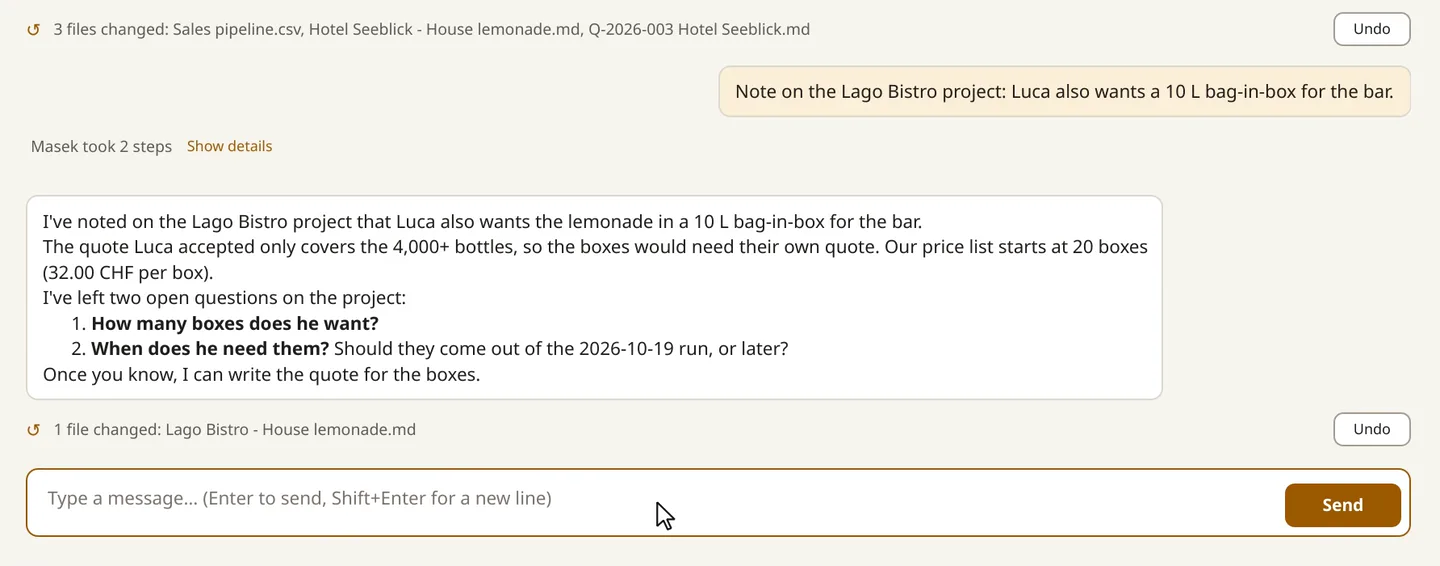
Sped up while Claude thinks; real replies take a little longer.

Text version
  1. Masek is asked: "Process yesterday's tasting with Cafe Moreno."
  2. It reads the tasting transcript that is already in the studio folder and writes the meeting note.
  3. The answer lists what was decided for each flavour and who does what by when, and the project is updated.
  4. It ends with "5 files changed", with an Undo button.
TRUST

You stay in charge.

  • It asks first.

    Before Masek drafts or sends an email, creates a calendar event, shares a file or goes to a website, it shows you a card with what it wants to do. Approve or deny. If it can't reach you, the answer is no. And because it treats what's written in an email or document as information, not as orders, a strange email can't tell Masek what to do.

  • Every change can be undone.

    Masek keeps its own history of your studio folder. After a conversation, a routine or a table save, one click puts the folder back as it was before that step. In a conversation or a table, you can undo the undo, too.

  • Recipes, coming.

    A local recipe engine is in pilot with a first studio. It runs without Claude and keeps its results on the studio's Mac.

  • Your studio is plain files.

    Notes and spreadsheets in a folder you choose. Open them without Masek, back them up, take them with you. Masek doesn't lock anything in.

One click puts the change back.

Sped up while Claude thinks; real replies take a little longer.

Text version
  1. Masek adds a note to a project and shows "1 file changed", with an Undo button.
  2. Undo is pressed.
  3. Masek confirms: "Undone. Your files are back to how they were."
Approval card from the Morning stock check routine: Gmail · create_draft, a warning that the request may come from an email or a web page, and Approve and Deny buttons.
The card a routine shows before it saves an email draft.

What goes where

WhatWhere it goes
Your notes and spreadsheetsA folder on your Mac. Yours to open, copy or back up.
Editing a table yourselfOn your Mac.
Chat, routines, and what Masek reads to do the workGoes to Claude's cloud
Claude's cloud model, under your own Claude account and its terms.
Gmail, Google Calendar, Google Drive (if you connect them)Goes to Claude's cloud
Masek can read them to do its work without asking each time. Drafting, sending or changing anything always asks.
Your Claude sign-inClaude's own sign-in. Masek never sees your password or keys.
Masek's serversThere are none. The app sends nothing to us.

When you chat with Masek or a routine runs, Masek uses your own Claude account, and the notes and tables it reads go to Claude's cloud model. So keep formulations out of chats and notes. If you paste a recipe into a chat or a note, Claude can read it.

Undo uses a free tool from Apple; the setup call installs it with you. Undo covers your studio folder, not Masek's own settings.

HOW IT WORKS

A colleague on your Mac, with Claude doing the thinking.

Diagram. Inside the boundary "Your Mac": the studio folder, Masek, its history. Masek reaches Claude in the cloud through your Claude plan. Anything going to clients and suppliers passes a gate marked "your yes". The numbered list below describes the same steps.
  1. Your studio lives in a folder. Clients, projects, briefs, suppliers, price list, stock: notes and spreadsheets on your Mac. During the beta we set it up with you.
  2. You ask, or a routine starts. Masek hands the task to Claude, Anthropic's AI model, through the Claude account your studio already has. Claude reads the files it needs and does the work in your folder.
  3. Anything going out waits for you. Emails, invites, shared files, web requests: each one becomes a card. Approve or deny.
  4. Every change is kept. Masek records each step in its own history, so you can put it back.

Note: Masek needs a paid Claude plan that your studio holds itself, with Claude Code (the part of Claude that works on files) installed and signed in; setup does this with you. Masek's price never includes Claude.

Where Masek fits.

Masek isn't formulation, labelling or compliance software, and it doesn't try to be. It's the colleague that keeps the studio's knowledge together and does the routine steps, next to the tools you already use.

Masek compared with general AI assistants, formulation and PLM software, and spreadsheets
MasekGeneral AI assistantFormulation / PLM softwareSpreadsheets + folders
Knows your clients, briefs and decisionsYes:As notes it keeps and linksPartly:What you paste or connect each timePartly:Product and spec data, not the studio's dayPartly:If someone keeps them current
Formulation numbersComing: a local engine (in pilot)Written by a language modelCalculated, with ingredient databasesYour own formulas
Where recipes liveKeep them out of the folder; chat goes to ClaudeThe provider's cloudVendor cloud or company serverYour files
Nutrition facts, labels, regulatory databasesNoNoYes:Their coreManual
Certified for complianceNoNoPartly:OftenNo
Takes initiativeYes:Scheduled checks and drafts, while the app is openPartly:Some offer scheduled tasksPartly:Workflow rules set by an adminNo
Asks before email, invites or files go outYes:Every timePartly:Varies by product and settingn/an/a
SetupA Mac app and a guided callSign upAn implementation projectNone
CostFree during the beta + your own Claude planMonthly per userEnterprise licencesAlready paid
Runs onMac (M1 or newer)Web, desktop, mobileWebEverywhere

FAQ

Is my recipe data safe?

Masek doesn't calculate recipes in the beta yet. What you type in a chat, and the notes and tables Masek reads, go to Claude's cloud model under your own Claude account, so during setup we keep formulations out of the studio folder.

Will the AI make up numbers?

Masek doesn't produce recipe numbers in the beta; a local calculation engine is in pilot. For quotes, Masek is set up to take prices only from your price list and to leave a line open when a price isn't there. Treat every result as a draft: Masek shows its work so you can check it.

What does it cost?

Masek is free during the beta. Separately, everyone who uses Masek needs a paid Claude plan, billed by Anthropic, not by us. Masek's price will never include Claude. Conversations and routines count towards your plan's usage like any other Claude use. For a studio, that means one Claude plan per person who uses Masek.

Can my whole team use it?

Today Masek works best as the studio's office manager on one or two Macs: usually the founder's and the lead formulator's. Each person needs their own Claude plan. Several people working in the same studio folder at once isn't supported yet. Masek is for Mac (M1 or newer); there's no Windows version.

Is Masek formulation, labelling or compliance software?

No. It doesn't produce nutrition facts or labels and it isn't certified for regulatory compliance. The recipe engine in pilot flags some findings against EU labelling and additive rules to help a formulator, but that is a check, not a sign-off. Masek also keeps your compliance calendar and reminds you of deadlines.

Do I need to be technical?

No. You talk to Masek in plain language, and everything it keeps is ordinary files you can open in Excel, Numbers or any text editor. During the beta we set Masek up with you on a call: your folder, your price list, your quote terms and, if you're in the recipe pilot, the recipe engine.

Which Claude plan should a studio use?

A paid plan that includes Claude Code. For client work we suggest one of Anthropic's business plans; on a personal plan, check your privacy settings, including whether your chats may be used for training. Anthropic's current plans and terms are on its own website.

What happens when Masek wants to send something?

It stops and shows you a card: what it wants to do and the details, such as the recipient and the text. Approve or deny. If you don't answer, it doesn't happen. That includes email drafts in your own mailbox, calendar invites, orders, shared files, and anything outside your studio folder, such as running a program on your Mac.

Can it read my email?

Only if you connect Gmail, Google Calendar or Google Drive through your Claude account. Then Masek can read them to do its work, for example to register a new request, without asking each time. Anything that drafts, sends or changes something asks first. Instructions hidden inside an email are treated as information, not as orders. This lowers the risk of a malicious email; no system removes it completely.

Does it work with our existing spreadsheets?

Yes. Masek reads CSV and Excel files in your studio folder and edits CSV files; Excel files open to view. Most studios start by putting their stock list, price list and supplier list into the folder during setup. Very large tables, and CSV files saved in an older Excel format, open to view; setup converts them.

Does it record our meetings?

Not on the Mac. Give Masek the transcript from your video-call app, or your own tasting notes, and it does the rest.

Does it work when my Mac is closed?

No. Masek works while it's open and your Mac is awake. A routine missed earlier today runs when you open Masek. Older missed runs are listed, so you can start them yourself.

What if we stop using Masek?

Your studio folder is ordinary notes and spreadsheets. It stays on your Mac and opens without Masek.

Who makes Masek?

Masek is an independent product. It is not made, endorsed or supported by Anthropic.

See it with your own studio in mind.

We're opening Masek to a small number of beverage development studios. Tell us a little about yours. We'll show you Masek on a demo studio that works like yours, then set it up with you.

For studios of 2 to 10 people that develop drinks for clients: briefs, bench trials, tastings, quotes.

Computer

Does your studio use Claude already? (optional)

Not ready? Join the waitlist and we'll write when the beta opens, and nothing else.

We use your details only to reply to you. See Privacy.